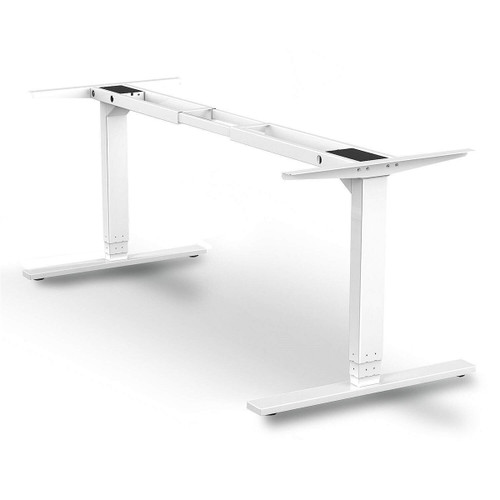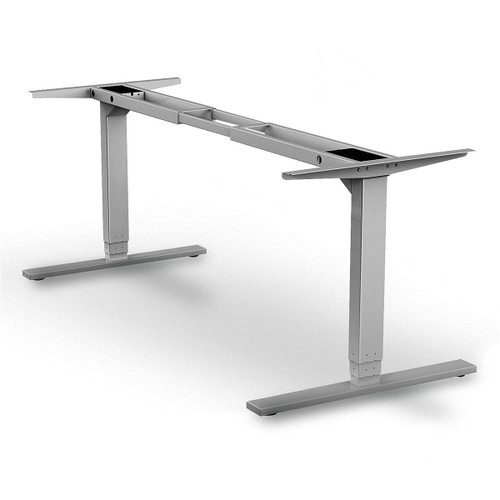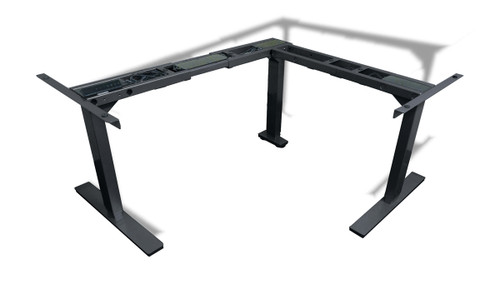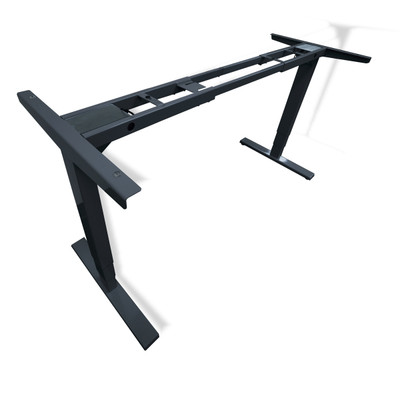


44"-72"-Wide Adjustable Height Desk Frame 3-Stage/2-Motor, Black
Powered Table Base designed for use with 44-72" overall tops
Two Motor, Three Stage Unit
Powder coat finish
Finish BU-Black Umber
Control Box with RJ 45 and Molex plug connections, up and down 4 button control with settings.
PLEASE NOTE: PRICING IS FOR FRAME AND CONTROL UNIT ONLY, IT DOES NOT INCLUDE THE TOP
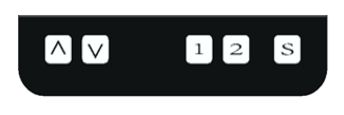
Powered Table Controller Setup Instructions
(For Handset Controls and Error code see below)
Please assemble the unit and follow the instructions below for proper initialization.- NOTE: MAKE SURE THERE IS NOTHING UNDER THE DESK FOR IT TO RUN INTO, THE TABLE WILL LOWER TO ABOUT KNEE HEIGHT.
a) Ensure that all leg cables are connected to the control box.
b) Ensure the handset is connected to the control box.
c) Plug the power cord into control box and a wall outlet (the table is designed for US 110/120 Volt 3 amp operation)
d) To calibrate the table, Click the S (like a mouse click) button,- The screen should read SET
- Then press the DOWN button twice until you see CAL.
- Click the S Button and allow the table to go to minimum height.
- You may notice a slight bounce as the leg syncs and stops. Both legs are at the lowest position.
- You should now be able to use the table in normal mode. Press the UP Arrow to confirm it is working correctly.
-
WARNING*******
This Setup must be done prior to operating the table, this sync's the table base with the controller for proper use. Failure to do so may result in service calls.- To calibrate the table, Click the S (like a mouse click) button,
- The screen should read SET
- Then press the DOWN button twice until you see CAL.
- Click the S Button and allow the table to go to minimum height.
- You may notice a slight bounce as the leg syncs and stops. Both legs are at the lowest position.
- You should now be able to use the table in normal mode. Press the UP Arrow to confirm it is working correctly.
Your desk is now ready to use. Press and Hold the UP Arrow until the unit begins to move, set to desired height. - To calibrate the table, Click the S (like a mouse click) button,
- Store a memory position :
The two buttons with numbers 1, 2 are used to store up to two table heights.
Step 1: Raise or lower the desk to the height you want to store
Step 2: Press 1 or 2 button for 3 seconds to store the height the display will flash SUC for 3 seconds and it will be ready to use.
If still doesn"™t work properly, please unplug the unit and wait two minutes before replugging the power in. The settings should be restored to normal.
Make sure the desk is reset to the lowest position (You may need to go through the manual reset described above to recalibrate the unit).
___________________________________________________________________________________________________________________________________________ - HANDSET MANUAL AND CODE SETTINGS
Normal (standard) mode: -
KEY ACTION DESCRIPTION UP Press and hold The desktop will move upward until you release the key DOWN Press and hold The desktop will move downward until you release the key S Click to Lock Click S to lock the keypad, click a second time to unlock the keypad. Also unlocks hibernate mode S LONG Press for 5 seconds Enter menu area, the screen should change to SET, you can arrow down to select menu function SET/RST/CAL/RET 1 Press Desktop will move to memory setting #1 2 Press Desktop will move to memory setting #2 1 LONG Press for 3 seconds Move desktop height to desired location, long press 1 to set memory #1 2 LONG Press for 3 Seconds Move desktop height to desired location, long press 2 to set memory #2 - Store Mode: (Press S Key to switch to store mode)
-
KEY ACTION Description Up Press Saves current position as highest limit Down Press Saves current position as lowest limit 1 Press Saves current position as #1 2 Press Saves current position as #2 3 Press Saves current position as #3 4 Press Saves current position as #4 M Press Cancels Memory Store and Returns to Normal Mode 3 Press for 3 seconds Changes unit of height between inches and cm 4 Press for 3 seconds Calibration and move to minimum height
Sleep Mode:
The unit will go into sleep mode if left for 1 minute. Press the S key to wake up the unit.
Locked Mode:
Clicking "S Key can lock or unlock the Child Safety Feature
ERROR CODES:
|
|
|
|
|
|
|
|
|
|
|
|
|
|
|
|
|
|
|
|
|
|
|
|
|
|
|
|
|
|
|
|
|
|
|
||
|
|
|
|
|
|
|
|
|
|
|
|
Features
-
Powered Table Controller Setup Instructions
(For Handset Controls and Error code see below)
Please assemble the unit and follow the instructions below for proper initialization.- NOTE: MAKE SURE THERE IS NOTHING UNDER THE DESK FOR IT TO RUN INTO, THE TABLE WILL LOWER TO ABOUT KNEE HEIGHT.
a) Ensure that all leg cables are connected to the control box.
b) Ensure the handset is connected to the control box.
c) Plug the power cord into control box and a wall outlet (the table is designed for US 110/120 Volt 3 amp operation)
d) To calibrate the table, Click the S (like a mouse click) button,- The screen should read SET
- Then press the DOWN button twice until you see CAL.
- Click the S Button and allow the table to go to minimum height.
- You may notice a slight bounce as the leg syncs and stops. Both legs are at the lowest position.
- You should now be able to use the table in normal mode. Press the UP Arrow to confirm it is working correctly.
-
WARNING*******
This Setup must be done prior to operating the table, this sync's the table base with the controller for proper use. Failure to do so may result in service calls.- To calibrate the table, Click the S (like a mouse click) button,
- The screen should read SET
- Then press the DOWN button twice until you see CAL.
- Click the S Button and allow the table to go to minimum height.
- You may notice a slight bounce as the leg syncs and stops. Both legs are at the lowest position.
- You should now be able to use the table in normal mode. Press the UP Arrow to confirm it is working correctly.
Your desk is now ready to use. Press and Hold the UP Arrow until the unit begins to move, set to desired height. - To calibrate the table, Click the S (like a mouse click) button,
- Store a memory position :
The two buttons with numbers 1, 2 are used to store up to two table heights.
Step 1: Raise or lower the desk to the height you want to store
Step 2: Press 1 or 2 button for 3 seconds to store the height the display will flash SUC for 3 seconds and it will be ready to use.
If still doesn"™t work properly, please unplug the unit and wait two minutes before replugging the power in. The settings should be restored to normal.
Make sure the desk is reset to the lowest position (You may need to go through the manual reset described above to recalibrate the unit).
___________________________________________________________________________________________________________________________________________ - HANDSET MANUAL AND CODE SETTINGS
Normal (standard) mode: -
KEY ACTION DESCRIPTION UP Press and hold The desktop will move upward until you release the key DOWN Press and hold The desktop will move downward until you release the key S Click to Lock Click S to lock the keypad, click a second time to unlock the keypad. Also unlocks hibernate mode S LONG Press for 5 seconds Enter menu area, the screen should change to SET, you can arrow down to select menu function SET/RST/CAL/RET 1 Press Desktop will move to memory setting #1 2 Press Desktop will move to memory setting #2 1 LONG Press for 3 seconds Move desktop height to desired location, long press 1 to set memory #1 2 LONG Press for 3 Seconds Move desktop height to desired location, long press 2 to set memory #2 - Store Mode: (Press S Key to switch to store mode)
-
KEY ACTION Description Up Press Saves current position as highest limit Down Press Saves current position as lowest limit 1 Press Saves current position as #1 2 Press Saves current position as #2 3 Press Saves current position as #3 4 Press Saves current position as #4 M Press Cancels Memory Store and Returns to Normal Mode 3 Press for 3 seconds Changes unit of height between inches and cm 4 Press for 3 seconds Calibration and move to minimum height
Sleep Mode:
The unit will go into sleep mode if left for 1 minute. Press the S key to wake up the unit.
Locked Mode:
Clicking "S Key can lock or unlock the Child Safety Feature
ERROR CODES:
- CODE
- DESCRIPTION
- CAL
- Calibration
- Unit needs calibration and reset (see above)
- E01
- Motor 1 Hall Effect
- Stop all legs and check wire connections to leg motor #1
- E02
- Motor 2 Hall Effect
- Stop all legs and check wire connections to leg motor #2
- E03
- Motor 3 Hall Effect
- Stop all legs and check wire connections to leg motor #3 (If supplied with 3rd leg unit (120 and 90 degree units)
- E04
- Motor 1 Overcurrent
- Remove load from leg motor #1
- E05
- Motor 2 Overcurrent
- Remove load from leg motor #2
- E06
- Motor 3 Overcurrent
- Remove load from leg motor #3 (If supplied with 3rd leg unit (120 and 90 degree units)
- E07
- Balance protection
- Stop all legs check wire connections and/or remove load from desktop
- H01
- Hot motor protection
- Stop all legs a count down display will flash intermittently, wait 18 minutes, once the cycle is complete, leg height will display.
- SUC=0
- Successful Calibration
- Calibration Success and table is at lowest height. Press and hold up arrow to start table.
- CAN
- Cancel low or high limit
- Cancel low or high limit settings
- FAL
- Failure on low or high limit
- Low or high limit setting failed, reset.
- LOC
- Child safety lock is on
- Child safety lock is on. See lock setting instructions to unlock
- UNL
- Cancel Child safety lock
- Cancel Child safety lock. See lock setting instructions to unlock
| SPECIFICATIONS: | |
| Motors | Two |
| Motor Rating | 5 amp |
| Control Box Rating | 3 amp |
| Control Box Power Draw | 1.67 amp @ 120v AC |
| Control Box Wattage | 200W |
| Noise Level | Below 50Db |
| Stages | Three |
| Top Width | Adjustable 44-72" |
| Top Arm Depth | 22 13/16" |
| Base Construction | Bar, Flat and Tube Steel |
| Frame Construction | Tube Steel |
| Finish | Black Powder Coat |
| Base Length | 23 5/8" |
| Base Width | 3 1/2" |
| Shortest Width | 44" |
| Longest Width | 70" |
| Range of Height | 23 1/2" - 46 1/4" top of frame |
| Tested to | BIFMA / ANSI and UL E493537 Test Date August 2017 |
| Warranty (Limited see specification sheet) | 5 Year on frame 2 Year on motor and control box |
44"-72"-Wide Adjustable Height Desk Frame 3-Stage/2-Motor, Black
Powered Table Base designed for use with 44-72" overall tops
Two Motor, Three Stage Unit
Powder coat finish
Finish BU-Black Umber
Control Box with RJ 45 and Molex plug connections, up and down 4 button control with settings.
PLEASE NOTE: PRICING IS FOR FRAME AND CONTROL UNIT ONLY, IT DOES NOT INCLUDE THE TOP
Powered Table Controller Setup Instructions
(For Handset Controls and Error code see below)
Please assemble the unit and follow the instructions below for proper initialization.- NOTE: MAKE SURE THERE IS NOTHING UNDER THE DESK FOR IT TO RUN INTO, THE TABLE WILL LOWER TO ABOUT KNEE HEIGHT.
a) Ensure that all leg cables are connected to the control box.
b) Ensure the handset is connected to the control box.
c) Plug the power cord into control box and a wall outlet (the table is designed for US 110/120 Volt 3 amp operation)
d) To calibrate the table, Click the S (like a mouse click) button,- The screen should read SET
- Then press the DOWN button twice until you see CAL.
- Click the S Button and allow the table to go to minimum height.
- You may notice a slight bounce as the leg syncs and stops. Both legs are at the lowest position.
- You should now be able to use the table in normal mode. Press the UP Arrow to confirm it is working correctly.
-
WARNING*******
This Setup must be done prior to operating the table, this sync's the table base with the controller for proper use. Failure to do so may result in service calls.- To calibrate the table, Click the S (like a mouse click) button,
- The screen should read SET
- Then press the DOWN button twice until you see CAL.
- Click the S Button and allow the table to go to minimum height.
- You may notice a slight bounce as the leg syncs and stops. Both legs are at the lowest position.
- You should now be able to use the table in normal mode. Press the UP Arrow to confirm it is working correctly.
Your desk is now ready to use. Press and Hold the UP Arrow until the unit begins to move, set to desired height. - To calibrate the table, Click the S (like a mouse click) button,
- Store a memory position :
The two buttons with numbers 1, 2 are used to store up to two table heights.
Step 1: Raise or lower the desk to the height you want to store
Step 2: Press 1 or 2 button for 3 seconds to store the height the display will flash SUC for 3 seconds and it will be ready to use.
If still doesn"™t work properly, please unplug the unit and wait two minutes before replugging the power in. The settings should be restored to normal.
Make sure the desk is reset to the lowest position (You may need to go through the manual reset described above to recalibrate the unit).
___________________________________________________________________________________________________________________________________________ - HANDSET MANUAL AND CODE SETTINGS
Normal (standard) mode: -
KEY ACTION DESCRIPTION UP Press and hold The desktop will move upward until you release the key DOWN Press and hold The desktop will move downward until you release the key S Click to Lock Click S to lock the keypad, click a second time to unlock the keypad. Also unlocks hibernate mode S LONG Press for 5 seconds Enter menu area, the screen should change to SET, you can arrow down to select menu function SET/RST/CAL/RET 1 Press Desktop will move to memory setting #1 2 Press Desktop will move to memory setting #2 1 LONG Press for 3 seconds Move desktop height to desired location, long press 1 to set memory #1 2 LONG Press for 3 Seconds Move desktop height to desired location, long press 2 to set memory #2 - Store Mode: (Press S Key to switch to store mode)
-
KEY ACTION Description Up Press Saves current position as highest limit Down Press Saves current position as lowest limit 1 Press Saves current position as #1 2 Press Saves current position as #2 3 Press Saves current position as #3 4 Press Saves current position as #4 M Press Cancels Memory Store and Returns to Normal Mode 3 Press for 3 seconds Changes unit of height between inches and cm 4 Press for 3 seconds Calibration and move to minimum height
Sleep Mode:
The unit will go into sleep mode if left for 1 minute. Press the S key to wake up the unit.
Locked Mode:
Clicking "S Key can lock or unlock the Child Safety Feature
ERROR CODES:
|
|
|
|
|
|
|
|
|
|
|
|
|
|
|
|
|
|
|
|
|
|
|
|
|
|
|
|
|
|
|
|
|
|
|
||
|
|
|
|
|
|
|
|
|
|
|
|
| SPECIFICATIONS: | |
| Motors | Two |
| Motor Rating | 5 amp |
| Control Box Rating | 3 amp |
| Control Box Power Draw | 1.67 amp @ 120v AC |
| Control Box Wattage | 200W |
| Noise Level | Below 50Db |
| Stages | Three |
| Top Width | Adjustable 44-72" |
| Top Arm Depth | 22 13/16" |
| Base Construction | Bar, Flat and Tube Steel |
| Frame Construction | Tube Steel |
| Finish | Black Powder Coat |
| Base Length | 23 5/8" |
| Base Width | 3 1/2" |
| Shortest Width | 44" |
| Longest Width | 70" |
| Range of Height | 23 1/2" - 46 1/4" top of frame |
| Tested to | BIFMA / ANSI and UL E493537 Test Date August 2017 |
| Warranty (Limited see specification sheet) | 5 Year on frame 2 Year on motor and control box |